Month: November 2024

  • 5 Smart Ways AI Enhances Your Amazon Shopping

    5 Smart Ways AI Enhances Your Amazon Shopping

    5 Smart Ways AI Enhances Your Amazon Shopping Experience

    Introduction

    This is Top 5 Smart Ways AI enhances your amazon shopping can be overwhelming, with millions of products and countless reviews. Thankfully, AI tools on Amazon make it easier to find what you need, compare options, and get personalized recommendations. Here are five powerful ways AI simplifies and improves your Amazon shopping experience:

    1. Chat with Rufus, Amazon’s AI Assistant
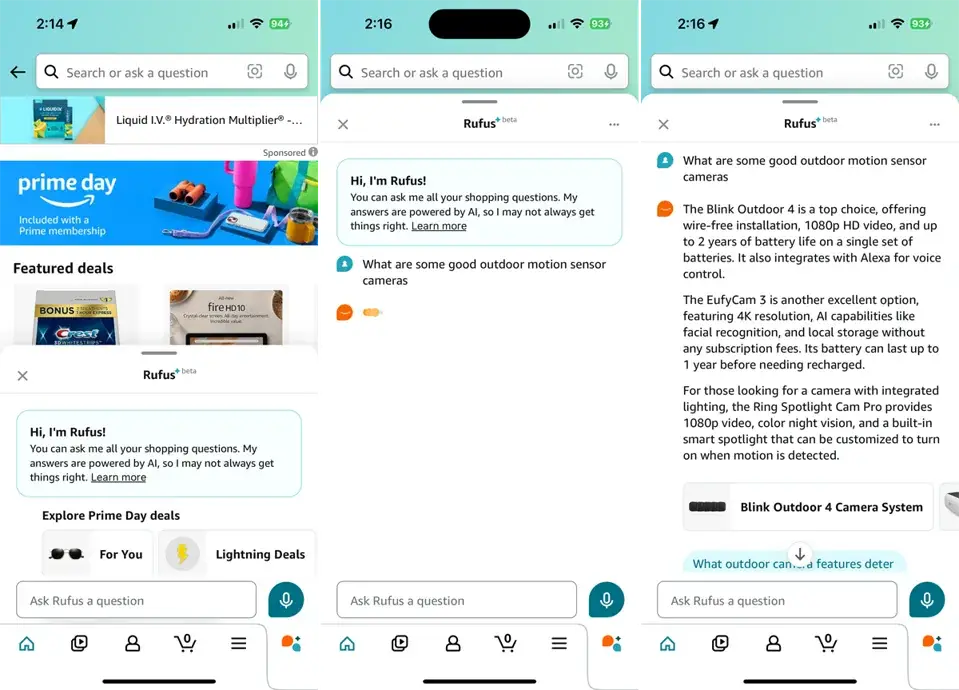
    Chat with Refus

    Amazon’s chatbot, Rufus, is a game-changer for quick and informative shopping assistance. Accessible through the Amazon app, Rufus can:

    • Recommend products based on your queries.
    • Compare similar items and highlight key differences.
    • Provide updates on your orders.
    • Offer tips for product-related activities, such as recipes or home improvement tasks.

    Simply type or speak your question, and Rufus will generate relevant responses by analyzing product listings, reviews, and community Q&A. For example, if you’re searching for the best outdoor security cameras, Rufus can provide a curated list of top-rated options.

    2. AI-Generated Customer Review Summaries

    View an AI-Generated Summary

    Scrolling through hundreds of reviews to make an informed decision is time-consuming. Amazon’s AI-generated summaries condense customer feedback into bite-sized insights. Here’s how it works:

    • Navigate to the Customer Reviews section on a product page.
    • View an AI-generated overview highlighting both positive and negative feedback.
    • Drill down into specific attributes, such as “ease of use” or “durability,” to see excerpts from reviews.

    This feature is perfect for quickly understanding the strengths and weaknesses of a product before purchasing.

    3. Personalized Clothing Size Recommendations

    Finding the right clothing size online can be tricky, but Amazon’s AI simplifies this process. Based on millions of customer orders and your purchase history, the platform suggests your ideal size for specific items. For instance, if you’re shopping for a jacket, the size menu might display: “Medium is your recommended size.”

    This personalized approach reduces the guesswork and improves the likelihood of a perfect fit. Just remember to consult the size chart for additional guidance.

    4. Smart Product Search and Q&A Integration

    Amazon’s AI also assists by answering product-specific questions. In the “Looking for specific info?” section, you can type or voice your query, and the AI scours product details, reviews, and Q&A to provide relevant answers. For example:

    • Ask about the battery life of a gadget.
    • Check if a kitchen appliance is dishwasher-safe.

    Additionally, the AI displays popular questions and answers from other customers, offering even more clarity before you make a purchase.

    5. Visual Search with Amazon Lens

    Amazon’s AI-powered visual search tool, available through the app, takes shopping to the next level. With Amazon Lens, you can:

    • Snap a photo of an item you like (e.g., a pair of sneakers).
    • Instantly find similar products available on Amazon.
    • Compare prices and read reviews for quick decision-making.

    This tool is especially helpful when you’re inspired by items you see in real life but aren’t sure how to search for them online.

    Common Questions about Top 5 Smart Ways AI Enhances Your Amazon Shopping

    How does Amazon’s AI help in finding the best products?

    Amazon’s AI uses chatbots like Rufus to analyze product listings, customer reviews, and Q&A sections to recommend top products tailored to your needs.

    Can AI on Amazon recommend the right clothing size for me?

    Yes, Amazon’s AI suggests sizes based on your purchase history, customer data, and product details.

    What is Rufus, and how does it assist with shopping on Amazon?

    Rufus is an AI chatbot on Amazon’s app that answers questions, recommends products, and tracks orders.

    Are AI-generated summaries for customer reviews accurate?

    They provide condensed insights but might miss nuances; it’s good to read full reviews for a balanced view.

    How can I ask Amazon’s AI specific product-related questions?

    Use the “Search in reviews, Q&A…” section on product pages to type or speak queries, and AI will provide tailored answers.

    Conclusion

    Finally thi is top 5 Smart Ways AI Enhances Your Amazon Shopping So AI is transforming the way we shop on Amazon by saving time, improving personalization, and enhancing product discovery. From chatbots like Rufus to AI-generated summaries and visual search, these tools make online shopping smarter and more efficient. While AI is not perfect, it significantly reduces the stress of finding the right products in Amazon’s vast marketplace. Give these features a try and experience the difference for yourself!

    Now We Waiting other platform to start a powerful AI Shopping like amazon, why not Temu shopping or Aliexpress shopping !?

    References :
    Image : (Credit: PCMag / Amazon) https://me.pcmag.com/
  • Google sheets project management template

    Google sheets project management template

    Google sheets project management template

    Introduction

    Google sheets project management template 2025 its just a online sheets but this is a tool on google workspace, so in today fast-paced business environment, efficient project management is essential for success. Whether you’re a freelancer, startup owner, or small business manager, having a reliable system to organize, track, and execute projects can make or break your productivity. While various tools offer sophisticated project management solutions, they often come with high costs and a steep learning curve. Google Sheets, on the other hand, provides a flexible and accessible alternative. This article explores the benefits and features of a Google Sheets project management template and how it can help scale your business. Additionally, we’ll introduce our customizable Google Sheets Project Management Template to help you manage your projects effectively.

    Why Use a Google Sheets Project Management Template?

    For many professionals, Google Sheets serves as an intuitive yet powerful platform for data organization and tracking. With the right template, Google Sheets can become a comprehensive project management tool for any business. Here are a few reasons to consider using a Google Sheets project management template:

    1. Accessibility – Google Sheets is cloud-based, allowing you to access and update your projects from anywhere.
    2. Cost-Effectiveness – Unlike most project management software, Google Sheets is free, making it an ideal choice for small businesses and startups with limited budgets.
    3. Customizability – Google Sheets offers the flexibility to customize templates according to your business needs, without extensive technical knowledge.
    4. Real-Time Collaboration – With Google Sheets, team members can edit the document simultaneously, fostering a collaborative environment.
    5. Data-Driven Decisions – Sheets offer data analysis features like charts, graphs, and pivot tables to help you visualize progress and make data-driven decisions.

    Key Features of the Google Sheets Project Management Template

    A well-designed Google Sheets project management template can streamline your workflow, enabling you to track multiple projects and stay organized. Here are the essential features of a project management template in Google Sheets:

    1. Task Management and Assignment

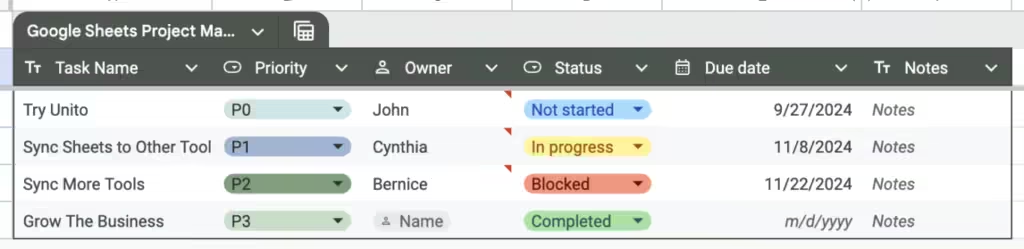
    The template includes task columns to list out individual tasks, assign them to team members, set deadlines, and monitor completion status. You can add color-coded priority markers to emphasize critical tasks and deadlines.

    2. Timeline Tracking

    A timeline or Gantt chart feature allows you to visually track the progress of your projects. Google Sheets can be set up with conditional formatting to automatically update timelines and show dependencies between tasks.

    3. Budget Management

    Managing a project budget is vital, especially for resource-intensive projects. With our template, you can allocate resources and track expenses, ensuring you stay within budget while keeping stakeholders informed of spending patterns.

    4. Automated Progress Tracking

    Google Sheets allows for automation through formulas. With automated progress tracking, you can see an overview of how much of the project has been completed, identify bottlenecks, and gauge whether you’re on track to meet deadlines.

    5. Team Collaboration and Communication

    With Google Sheets, team members can leave comments directly on tasks or updates, facilitating clear and timely communication. This feature is especially helpful for remote teams working across different time zones.

    6. KPI and Goal Tracking

    Our template includes key performance indicators (KPIs) and goal-setting sections, allowing you to measure the success of your projects. Setting KPIs gives team members clear targets and provides stakeholders with progress visibility.

    7. Customizable Dashboard

    A customizable dashboard provides a visual overview of project performance. With charts and graphs, the dashboard consolidates data so you can quickly grasp key metrics like project completion percentage, team member workloads, and budget utilization.

    How to Scale Your Business Using Google Sheets

    1. Streamline Workflows for Better Efficiency

    With organized workflows and real-time updates, Google Sheets helps prevent miscommunication, reduces project delays, and keeps tasks progressing smoothly. This streamlined approach allows your team to focus on high-priority tasks, contributing to overall productivity.

    2. Enhance Budget Tracking and Control

    The built-in budgeting features in our Google Sheets template help you monitor expenses and anticipate costs. Effective budget management can enhance financial stability, reduce the risk of overspending, and allow you to reinvest savings into business growth.

    3. Improve Team Collaboration

    As your team grows, Google Sheets enables remote and in-office teams to collaborate seamlessly. With live updates and comment capabilities, it ensures everyone stays aligned with project objectives, regardless of location.

    4. Track Progress and Make Data-Driven Decisions

    Google Sheets’ data analysis tools empower you to review project metrics at a glance, enabling proactive adjustments to timelines, resources, and budgets. This data-driven approach is essential for scaling effectively, as it helps avoid potential pitfalls and maximize efficiency.

    5. Adapt to Changing Business Needs

    Because Google Sheets is highly customizable, it can grow with your business. You can adjust the template to incorporate new metrics, workflows, or team members without switching to a different software. This adaptability can save your business both time and money.

    Selling Your Digital Product: Google Sheets Project Management Template

    Are you ready to enhance your project management capabilities? Our Google Sheets Project Management Template is crafted to simplify project tracking, streamline workflows, and drive business growth. Perfect for freelancers, small businesses, and teams of all sizes, this template is a cost-effective solution that combines all essential project management tools in one customizable, easy-to-use format.

    With features like automated progress tracking, budget management, and a built-in Gantt chart, our template enables you to oversee every project detail at a glance. Plus, its adaptability ensures that it will remain useful as your team and projects grow. Take the guesswork out of project management and start achieving your business goals faster.

    Conclusion

    In an era of complex software solutions, a Google Sheets project management template stands out for its simplicity, accessibility, and effectiveness. By leveraging Google Sheets for project management, you can streamline your workflows, foster collaboration, and make informed decisions—all crucial steps in scaling your business. Whether you’re a startup owner or a project manager, adopting this tool can set you on the path to growth and success.

    Our Google Sheets Project Management Template is designed to meet the unique needs of businesses at every stage of growth. Try it today and experience the benefits of a powerful, adaptable project management tool.

  • Streamline Your Business with Google Sheets Templates

    Streamline Your Business with Google Sheets Templates

    Introduction

    In today’s fast-paced business landscape, efficiency is everything, and businesses increasingly rely on tools that streamline operations and optimize productivity. One tool that has gained traction for its versatility and ease of use is Google Sheets. A powerful spreadsheet platform with robust functionality, Google Sheets supports data management and organization, crucial elements in businesses of all sizes. By utilizing Google Sheets templates, companies can simplify processes, manage finances, track projects, and even collaborate across teams seamlessly. This article explores how Google Sheets templates, such as budget, schedule, and project management templates, can drive business efficiency, along with recommendations on maximizing its features for everyday use.

    What Are Google Sheets Templates?

    Google Sheets templates are pre-designed spreadsheets that help businesses perform a variety of tasks, from budgeting to project management. They offer built-in formulas, data visualization, and layout structures that save businesses from creating complex spreadsheets from scratch. These templates are a go-to choice for many because they can be easily customized to suit different business needs, whether tracking monthly expenses or managing timelines for complex projects.

    Why Use Google Sheets for Business?

    Businesses choose Google Sheets for multiple reasons. First, it’s cloud-based, so teams can access and edit data in real time from anywhere with internet access. This collaboration capability makes it easy for businesses to operate flexibly and efficiently. Additionally, Google Sheets integrates smoothly with other Google Workspace tools, facilitating seamless workflow within a single platform. It also offers powerful formulas and automation functions, enabling businesses to build custom solutions without investing in costly software.


    Key Google Sheets Templates to Consider

    1. Budget Template Google Sheets

    A budget template in Google Sheets is essential for businesses that need to monitor expenses and manage cash flow effectively. This template enables businesses to set financial goals, track income, and record monthly or yearly expenses. It can help with real-time financial forecasting, allowing stakeholders to make informed decisions based on current data.

    • Features: Automated calculations, customizable income and expense categories, visual graphs for expense tracking
    • Pros: User-friendly, free, and highly customizable
    • Cons: Limited advanced analytics for large financial operations

    2. Schedule Template Google Sheets

    The schedule template helps businesses manage time efficiently. It enables users to create detailed schedules for employees, projects, or meetings. This template can improve productivity by keeping everyone on track and aware of deadlines.

    • Features: Timeline view, daily/weekly/monthly scheduling options, color-coding for task differentiation
    • Pros: Real-time updates for teams, easy integration with Google Calendar
    • Cons: Basic scheduling options may not meet all business needs

    3. Timeline Template Google Docs

    A timeline template in Google Sheets is ideal for project planning. It allows businesses to visualize each phase of a project and its corresponding timeline, making it easier to manage milestones and track progress.

    • Features: Gantt chart functionality, milestone tracking, deadline alerts
    • Pros: Visual representation of project stages, simple milestone management
    • Cons: May lack the advanced features found in dedicated project management software

    4. Monthly Budget Template Google Sheets

    This template is ideal for businesses that require detailed monthly budget tracking. It provides a clear layout to input revenues and expenses, monitor variances, and track budget adherence.

    • Features: Budget variance analysis, data visualization, expenditure tracking
    • Pros: Helps keep monthly finances on track, easy-to-read format
    • Cons: Limited for large-scale budget analysis without customization

    5. Project Management Template Google Sheets

    A project management template is a versatile tool for handling multiple projects. This template can help assign tasks, set deadlines, and monitor each project’s progress through a timeline or Kanban board format.

    • Features: Task tracking, deadline alerts, team assignments
    • Pros: Simple and customizable for any project type, facilitates team accountability
    • Cons: May not include advanced project tracking features of other PM software

    Benefits of Using Google Sheets Templates in Business

    1. Cost-Effective: Google Sheets is free for users with a Google account, making it a great choice for startups and small businesses looking to minimize software costs.
    2. Ease of Collaboration: Google Sheets allows multiple users to work on the same document simultaneously, making it ideal for teams that need to share real-time updates.
    3. Data Security: Since Google Sheets is part of the Google ecosystem, it benefits from Google’s robust security features, including two-factor authentication and end-to-end encryption.
    4. Customizable and Scalable: Templates in Google Sheets are highly customizable, which allows businesses to scale their data management as they grow.

    How to Use Google Sheets Templates for Various Business Functions

    Financial Planning

    For financial planning, templates like the Monthly Budget Template and Budget Template Google Sheets are essential. They allow businesses to set spending limits, forecast cash flows, and perform monthly reconciliation. Using pre-set formulas, these templates automatically calculate totals and variances, saving time and reducing errors.

    Project Management

    Google Sheets provides tools to manage projects using templates such as the Gantt Chart Google Sheets Template and Project Management Template. These templates help organize tasks, assign responsibilities, and track deadlines, making them crucial for project-based businesses.

    Scheduling and Timelines

    Scheduling templates are critical for businesses with complex timelines and team dependencies. The Schedule Template Google Sheets and Timeline Template Google Docs can be used to organize daily tasks, monitor employee shifts, and track project milestones. These templates ensure that timelines are clear, tasks are completed on schedule, and resources are allocated effectively.

    Inventory Tracking

    For businesses managing product stock, an inventory management template helps in tracking inventory levels, stock replenishments, and supplier details. Google Sheets’ flexible layout allows for easy customization, enabling businesses to create a robust inventory tracking system without additional software costs.

    Customer Relationship Management (CRM)

    A CRM template in Google Sheets helps track customer interactions, sales pipeline stages, and follow-up schedules. For small businesses, this template can serve as a basic CRM system, capturing essential client data without a heavy investment in CRM software.


    Top Five Google Sheets-Compatible Software

    While Google Sheets is powerful on its own, integrating it with additional tools can significantly expand its functionality. Here are five software options that enhance Google Sheets for business use:

    SoftwareDescriptionKey FeaturesPricing (approx.)ProsCons
    ZapierAutomates tasks between Google Sheets and other appsCustom workflows, app integrationsFree; $20+/monthSaves time with automation, no coding neededLimited for advanced users
    Coupler.ioAutomates data import/export between Google Sheets and other data sourcesAuto data sync, data mergingFree; $24+/monthGreat for data consolidation, easy to useLimited customization
    SheetgoManages and automates workflows in Google SheetsWorkflow automation, data linkingFree; $10+/monthSimplifies complex data workflowsLimited features for large teams
    SupermetricsImports marketing data directly into Google SheetsData visualization, custom reports$39+/monthIdeal for marketers, powerful reportingHigher price range
    AppSheetAllows for building apps directly from Google SheetsNo-code app building, integrates with SheetsFree; $5+/user/monthAllows for custom business app creationSteeper learning curve for beginners

    Common Questions about Google Sheets Templates for Business

    1. What types of businesses benefit most from Google Sheets templates?
      Google Sheets templates are highly versatile, benefiting businesses of all sizes in finance, project management, HR, and more.
    2. Can Google Sheets templates replace dedicated software?
      For small to medium-sized businesses, Google Sheets templates can be a viable alternative, though larger enterprises may need more specialized software.
    3. Is data stored in Google Sheets secure?
      Yes, Google Sheets uses encryption and Google Workspace’s security protocols, making it secure for business use.
    4. How can I create custom templates in Google Sheets?
      Start by creating your desired layout, save it, and use “Make a copy” as a reusable template.
    5. Can I integrate Google Sheets with other business tools?
      Yes, Google Sheets integrates with apps like Zapier, Supermetrics, and AppSheet for enhanced functionality.

    Conclusion

    Google Sheets templates are invaluable tools for businesses seeking a flexible, cost-effective solution for data management. From budgeting and scheduling to project and inventory management, Google Sheets’ templates provide an accessible, powerful platform for streamlining business operations. For those exploring the possibilities of Google Sheets, remember that combining it with integration tools like Zapier or Sheetgo can elevate its potential even further. As businesses continue to digitize and automate, Google Sheets templates remains a foundational resource for teams looking to optimize workflow and foster collaboration without compromising on quality or security.